 Ford Motor Company
Previous Work
Disability Compensation Application
The Whole Story
Ever wonder how apps make their way onto your car’s touchscreen? The mystery lies in the connectivity to an auto manufacturers APIs. Whether it’s Ford or GM, Stellantis or Mercedes, they’ve got their own ecosystem. And if you want to make something cool to go on that screen, you’re going to have to use one of their APIs.
That’s where the developer.ford.com site comes into the story. Say you’re a third-party developer who works for Waze, Progressive Auto Insurance or maybe even just an Indie developer wanting to build something fun for your car: You go to the developer site to gain access to these APIs. Ford had aggregated a list of all of their APIs (yes, there are a handful) and put all of the info you’d need to use it right on a single website. Nifty, right?
It was an incredible start, to be sure. But more work needed to be done. While they had the API references robustly listed, developers who wanted access to these APIs needed credential access – namely ‘keys’ – to connect to the APIs. This is pretty typical, but the way a developer got keys to our APIs was incredibly manual. They had to email someone on our team at Ford and that person would then manually generate a key which would be emailed to the developer. While this was a doable process, it wasn’t without flaw; sometimes delays occurred in getting the credentials created and communicated to the third-party developers (emails like “I’m waiting on my API keys” weren’t uncommon), and similarly, regenerating an API key meant that you might be waiting some time to get a new one.
Summarily, it wasn’t the epitome of ‘self service’; it was inefficient for both us and our customers who just wanted to manage it themselves. So the idea of creating a dashboard where developers could manage the APIs was born.
Framing a New Dashboard Experience
For us, creating a credential management dashboard was a 0-to-1 experience; nothing else like that existed on the website. So my first inclination was to do some competitive analysis. We know that other developer sites have this feature, but what does it look like? How does the inherent feature set compare with our goals for this product? After considering these questions and separating the wheat from the chaff, I came up with a handful of concepts to present to the team. It was reviewed for tech feasibility, obligatory hole-poking in the design occurred (thankfully) and we came up with a potential solution moving forward that we could test.
For our testing, we did five moderated tests and 8-10 unmoderated; the latter were simply given links to our development environment and asked to provide feedback. The results showed some need for tweaks, but as a whole we were certainly headed in the right direction. After agreeing upon some plans to test once we were live, the new dashboard was launched to great (internal) fanfare.
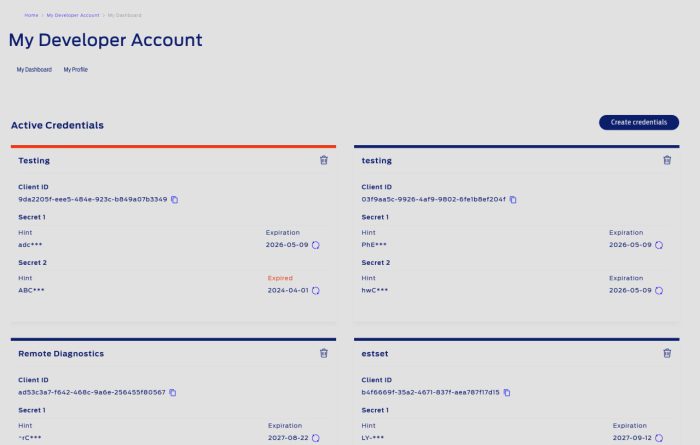
Features such as expiring credentials as well as regeneration of credentials were present at launch. Shortly after, the team added multiple ‘secrets’ (essentially these are the keys).
A Promising Future
Big plans were made to test the credentials dashboard and then…I was part of a layoff. Though I was never able to see the full results of the feature and test the efficacy, I feel confident it was something the team built on. Had I been there, I would’ve checked our analytics tool at the time and viewed the usage of the dashboard page in general, asked for some logs for how often users were creating new credentials and getting qualitative feedback on if our third-party developers liked using the tool – and how we might improve.
Fate is cruel, and I left this position with unfinished work. But what a fun and short ride it was with an excellent team.